

GxP-Compliant CMMS Software: From Equipment Records to Audit-Ready Maintenance
What makes GxP compliant CMMS software suitable for regulated maintenance is not the label, but whether its workflows and records support your equipment lifecycle and stand up to review. Paper logs, spreadsheets, and disconnected systems can make it difficult to trace maintenance and calibration activities or determine equipment status.
You need controlled records that support daily work, along with a clear understanding of which validation evidence a software provider supplies and what your organization must establish for its intended use.
This article explains how a CMMS can support controlled equipment maintenance and calibration, and what to assess in its data integrity controls, validation, and governance. It also outlines a risk-based implementation approach that connects equipment records to defined workflows, responsibilities, and audit readiness.
Table of Contents
What GxP-Compliant CMMS Software Supports in Regulated Maintenance
In pharmaceutical, biotechnology, and medical device operations, maintenance records help show whether equipment was maintained and remains suitable for its intended use. A computerized maintenance management system (CMMS) can organize equipment information and maintenance workflows, but a product label alone does not establish compliance. The broader principles behind GxP (Good x Practice) provide context for controlled records and documented work.
GxP compliant CMMS software supports controlled equipment maintenance records. Compliance depends on the organization’s intended use, system configuration, procedures, and documented validation. The software provides functions for recording and managing activities; your organization defines how those functions are configured, governed, and used.
Which maintenance activities can a CMMS support?
A CMMS can organize equipment lifecycle records, schedule preventive maintenance, document calibration activities, and track qualification status, depending on its functions and configuration. For example, an equipment record can associate an asset identifier with assigned maintenance tasks and their completion records. Staff can then review the equipment history when assessing status or preparing for an audit.
Define the workflow before relying on it. Specify who assigns, performs, reviews, and closes each task, and how overdue work or a change in equipment status is handled. Decide what information a work record must contain, such as the activity performed, its outcome, and any follow-up required. Linked records support traceability only when procedures tell staff what to record and how to review it. Confirm that the system’s functions match these requirements rather than assuming every CMMS has the same controls.
Maintenance: Assign recurring tasks and retain completion records.
Calibration: Track planned activities and related status records where supported.
Qualification: Record relevant status or link to controlled documentation, according to system capability and procedure.
These records help teams connect maintenance activity to equipment status, but they do not replace equipment qualification or ongoing quality oversight. Treat the CMMS as one part of a controlled process: responsibilities, system configuration, procedures, and validation evidence must align with its GxP use.
How CMMS Controls, Data Integrity, and Validation Work Together
Maintenance records are useful when their origin, timing, and history can be understood. In GxP compliant CMMS software, attributable records identify who performed or reviewed an activity, timestamps help establish when it occurred, and role-based access can restrict actions to authorized users. These controls support data integrity, but procedures must also define how staff create, correct, review, and retain records. The MHRA Guidance on GxP Data Integrity offers a reference point for considering governance across GxP data practices.
Validation depth should reflect the system’s intended use and the potential impact of failure on product quality, patient safety, and data integrity. Computer system validation is documented evidence that a computerized system consistently performs its intended function. For a CMMS, assess the configured workflows your teams will rely on. General vendor documentation alone does not prove that your local implementation is suitable.
Vendor documentation can describe the system and its supporting evidence. Your organization still needs to define intended use, assess risks, configure workflows, conduct appropriate testing, approve the system for use, and control changes. A software update, revised workflow, or changed user role may affect validated functions. Change control should determine whether further assessment or testing is needed.
What evidence supports CMMS validation?
Build the evidence set around actual use. Validation deliverables should map requirements to configured workflows and show that important functions were tested, reviewed, and approved. APS supports risk-based computer system validation following GAMP 5, with deliverables such as Validation Plans, Risk Assessments, IQ/OQ documentation, and Traceability Matrices. The CMMS validation guide provides further context for organizing this work.
Document intended use, requirements, and risk assessment.
Retain test evidence and traceability from requirements to results.
Record review, approval, and change-control decisions.
Align responsibilities early so vendor evidence and organization-specific decisions form one clear validation record. APS works with teams on CMMS validation planning and supporting documentation.
How to Evaluate GxP CMMS Software for Your Equipment and Team
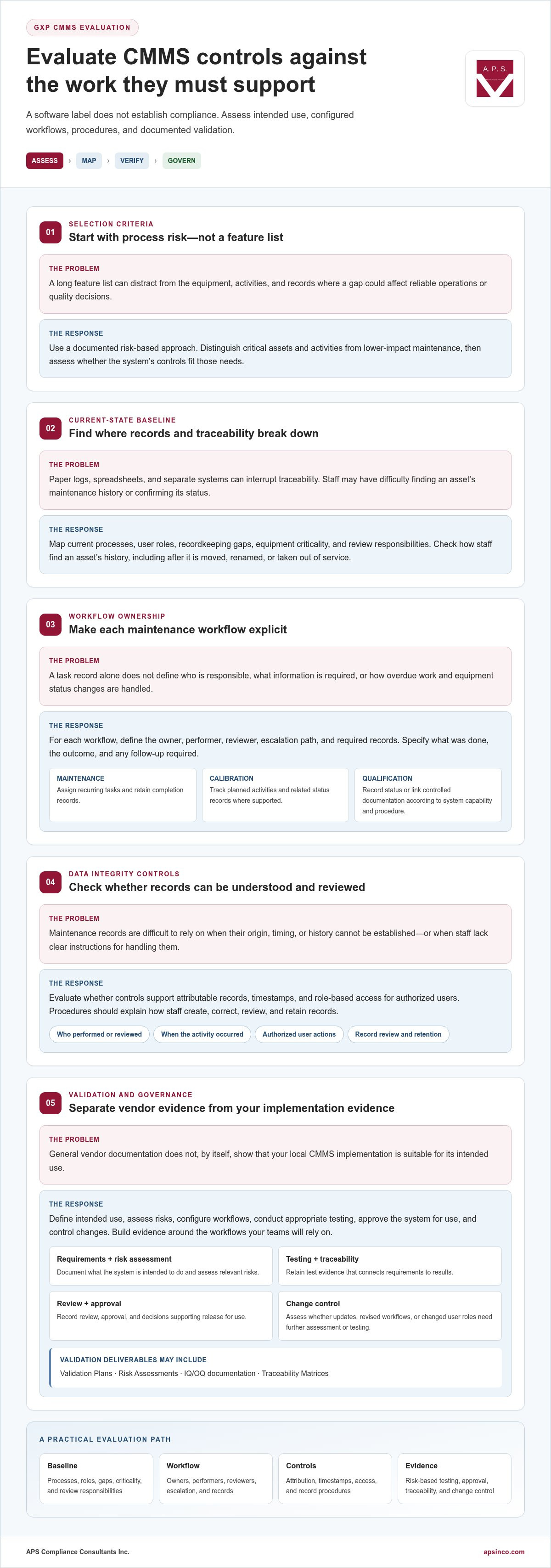
Start with the work, not a feature list. Assess controls against process risk. This helps you focus evaluation on the equipment, activities, and records where a gap could affect reliable operations or quality decisions.
Map equipment risk to workflow requirements
Use a documented risk-based approach to distinguish critical assets and activities from lower-impact maintenance. For each workflow, define its owner, performer, reviewer, escalation path, and required records. For assets requiring equipment qualification, identify how qualification status and supporting documentation relate to maintenance history. The equipment qualification guide provides context for planning those records.
Then assess the system in sequence:
1. Establish the baseline. Map current processes, user roles, recordkeeping gaps, equipment criticality, and review responsibilities. Note where paper, spreadsheets, or separate systems interrupt traceability. Check how staff currently find an asset’s maintenance history, including after it is moved, renamed, or taken out of service.
2. Test controls against intended use. Evaluate audit trails, access controls, electronic records, reporting, and workflow configuration using representative tasks. For example, test how a user records completed work, how a reviewer checks it, and how the system shows an overdue task. Confirm that users can create and review the records required by your procedures.
3. Plan the operating model. Consider deployment, data governance, integrations, support responsibilities, and how changes will be assessed after implementation. Define who owns configuration updates and workflow changes so the validated state remains governed.
Plan validation and implementation as connected work
Align configuration, testing, training, controlled procedures, and cutover planning. A phased deployment can help coordinate change across teams or sites while governance and user feedback develop alongside implementation. Keep each phase tied to approved requirements and evidence; staging a rollout does not remove the need to assess its intended use. APS applies GAMP 5 expertise through a risk-based approach; its GAMP 5 validation guide offers further context.
For support aligning evaluation with validation planning, discuss your CMMS implementation needs with APS.
How APS Connects CMMS Software with GxP Validation Support
A maintenance system delivers lasting value when its workflows work for the people responsible for equipment and quality records. APS collaborates with operational and quality teams to connect CMMS implementation with daily responsibilities, so configured processes can be followed consistently from task assignment through review.
From assessment to audit-ready operation
APS works with your organization to clarify how maintenance activities fit existing procedures and quality oversight. Your teams can define who owns equipment records, who acts on overdue tasks, and how staff raise issues when a workflow does not reflect actual practice. Clear responsibilities help keep system use aligned with operational needs.
Involving the people who perform and review maintenance tasks can surface unclear handoffs before they become routine. APS supports collaboration between staff to develop usable workflows, while your organization retains ownership of its procedures, approvals, and quality decisions.
After deployment, keep the system connected to its operating context. Assign responsibility for monitoring workflow issues, communicating approved process changes, and ensuring affected users understand revised procedures. Regular operational review can identify workflows that need clarification or records that do not support effective oversight.
APS provides CMMS solutions alongside data integrity and validation support, connecting system implementation with operational governance. Alleye CMMS and PharmaRockIT CMMS support equipment lifecycle management, including maintenance, calibration, and qualification activities. APS can also support computer system validation and equipment qualification so system controls and documented processes are considered together.
If you are planning a CMMS project or reviewing existing maintenance processes, discuss your CMMS and validation objectives with APS to identify a practical path forward for your teams.
Make Your Next CMMS Decision a Governed One
Choosing GxP compliant CMMS software is also an opportunity to set a clear direction for maintenance operations. Before moving forward, agree on how you will assess performance over time, who will monitor whether workflows remain fit for purpose, and how operational needs will inform governance decisions.
A shared view of these priorities gives maintenance, quality, and system owners a practical basis for consistent decisions as requirements change. Focus on processes your teams can sustain and oversight they can apply in routine operations.
Take the next step with a clear view of your objectives. Discuss your GxP CMMS and validation needs with APS to plan maintenance governance around your intended use and operational requirements.
Frequently Asked Questions
Can CMMS software alone make a maintenance process GxP-compliant?
No. A system can record actions, but it cannot determine whether the work was technically adequate or whether a quality decision was appropriate. A completed work order, for example, does not by itself establish that a repair restored equipment suitability. Define how staff assess findings and decide whether equipment can return to use, and make those decisions visible in the relevant quality process.
What records should a GxP CMMS maintain for equipment maintenance?
Plan how records will remain usable throughout their retention period, beyond capturing the work itself. Decide how staff will locate historical activity if an asset is renamed, moved, or taken out of service, and how records can be retrieved when the original operator is unavailable. Test these scenarios before routine use so audit preparation does not depend on individual memory or informal file searches.
How does GAMP 5 apply to CMMS validation?
GAMP 5 is an industry good-practice framework, not a regulation. It can help teams structure validation decisions, document system context, and make reasoned use of supplier information. Apply it to the specific CMMS configuration and organizational processes rather than treating a generic package as proof of suitability. The framework supports consistent planning, while your organization’s procedures define how decisions are approved.
Can a CMMS support calibration and equipment qualification workflows?
A CMMS can help coordinate these activities, but tracking a due date is not the same as demonstrating that an instrument produced acceptable results or that equipment remains suitable for its intended use. Define where calibration findings are assessed and how an unacceptable result is escalated. Keep the relationship between status information and supporting technical evidence clear to staff and reviewers.
What should teams review when changing a validated CMMS?
Include data and operational readiness in the review, not only software functions. If records are migrated or reorganized, reconcile a sample against source records and confirm that users can retrieve the information they need. Review affected reports and interfaces, then prepare role-specific training where the user experience changes. These checks help detect transition issues before teams rely on the revised system for routine maintenance.


Comments