

Laboratory Workflow Automation Software: From Manual Steps to Audit-Ready Workflows
Automate governed handoffs before aiming for an autonomous laboratory. In GxP-regulated environments, laboratory workflow automation software can reduce repetitive transfers, but instrument data, records, and process controls must remain connected and governed. When analysts copy results from instruments into worksheets or re-enter them across systems, each handoff creates an opportunity for transcription errors and makes traceability harder to demonstrate.
Automation should strengthen, not bypass, validated processes and data integrity controls. This article explains how to map manual steps to suitable automation opportunities, assess instrument connectivity and system fit, and plan a risk-based implementation that supports audit readiness. You’ll also see how workflow software, instruments, and computer system validation work together, including how modular capabilities such as LIMS, electronic workbooks, and instrument connectivity can address distinct laboratory needs. Prioritize handoffs based on data criticality, frequency of manual entry, and the consequences of an error. Then progress in phases, keeping review, traceability, and validation evidence in view.
Table of Contents
What Laboratory Workflow Automation Software Solves in a GxP Lab
Laboratory workflow automation software coordinates tasks, records, data, and review steps across a laboratory process. Digitization converts paper or manual records into electronic form, while automation also governs how work moves between steps. This distinction matters in a GxP-regulated environment. A scanned worksheet may be electronic, but it doesn’t by itself assign responsibility, connect results to a sample, or route work for review. The broader concept of Laboratory automation includes using equipment and software to reduce manual intervention.
Consider a QC sample lifecycle. Staff receive and identify a sample, perform an analytical method, capture instrument output, review results, and prepare a report. If a result is retyped between instrument software, a worksheet, and the final record, the sample identifier, value, units, or context could be entered incorrectly. A well-defined workflow links the result to its sample and execution record, makes task ownership visible, and routes the record for review. It should preserve qualified review wherever scientific judgment is required.
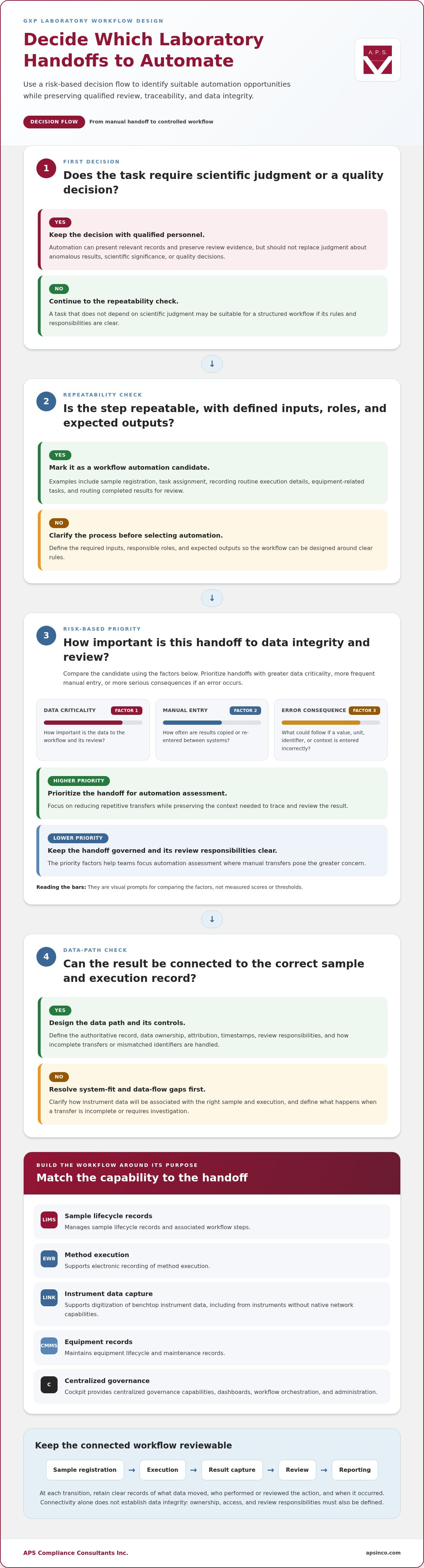
Which laboratory handoffs are suitable for automation?
Start with repeatable steps that follow defined rules: sample registration, task assignment, recording routine execution details, equipment-related tasks, and routing completed results for review. These activities are suitable for structured workflows when the required inputs, responsible roles, and expected outputs are clear. By contrast, assessing anomalous results, determining scientific significance, or making a quality decision requires qualified personnel. Automation should present relevant records and preserve review evidence, not replace that judgment.
How automation relates to LIMS, EWB, and instrument connectivity
A LIMS supports sample lifecycle records; an electronic workbook (EWB) supports documented method execution; and PharmaRockIT LINK supports digitization of benchtop instrument data, including from equipment without native network capabilities. Together, these capabilities can address different handoffs, but their intended use and data flows should be clearly defined. For example, determine which system holds the authoritative sample record and how an instrument result is linked to the relevant execution. For selection considerations, see the LIMS software selection guide.
How Laboratory Workflow Automation Software Connects Data, Instruments, and Teams
A connected workflow can carry a sample identifier from registration through execution, result capture, review, and reporting. At each transition, records should show what data moved, who performed or reviewed the action, and when it occurred. Define how to handle incomplete transfers, mismatched identifiers, and results that need investigation, so exceptions do not disappear between systems. These practices support sound Research Data Management (RDM), including the organization, documentation, storage, and preservation of information throughout its lifecycle.
Each PharmaRockIT capability has a distinct role. Laboratory workflow automation software connects these activities, but teams still need defined ownership for records and review:
LIMS: Manages sample lifecycle records and associated workflow steps.
EWB: Supports electronic recording of method execution.
LINK: Supports digitization of benchtop instrument data, including from instruments without native network capabilities.
CMMS: Maintains equipment lifecycle and maintenance records.
Cockpit: Provides centralized governance capabilities, dashboards, workflow orchestration, and administration.
How instrument data enters an electronic workflow
LINK supports instrument connectivity, helping teams reduce manual rekeying by moving instrument data into an electronic workflow. During workflow design, define how the data is associated with the correct sample and execution record, and how attribution, timestamps, review, and exceptions are retained. Check that the transferred result preserves the context needed for review, including its relationship to the source instrument and the task performed. Connectivity alone doesn’t establish data integrity: ownership, access, and review responsibilities must also be clear. For regulatory context, see the 21 CFR Part 11 requirements guide.
Connected systems still need defined data ownership and review. A complete data path is trustworthy only when accountable people can interpret and verify its records. APS works with laboratory and quality teams to align software workflows with operational and validation needs. Discuss your laboratory workflow.
How to Automate Laboratory Workflows Without Weakening GxP Controls
Define the controls before configuring laboratory workflow automation software. A risk-based approach aligns validation and safeguards with intended use, data criticality, and potential impact on product quality or patient safety. Computer system validation is documented evidence that a computerized system consistently performs its intended function. It must be maintained through controlled changes and ongoing oversight, not treated as a one-time task.
Use a practical sequence:
1. Define intended use: Specify the workflow, users, records, and decisions the system will support. Identify the authoritative record for each key data element.
2. Map risks: Identify critical data, manual handoffs, failure points, and effects on quality or safety. Include risks from incorrect identifiers, incomplete transfers, and overlooked exceptions.
3. Configure controls: Set appropriate access, audit trails, data review responsibilities, and exception handling. Define how corrections and rejected or incomplete records are managed.
4. Validate: Test functions against approved requirements and document results, including how the workflow responds to expected exceptions.
5. Train: Prepare users for their roles, including review, correction, and escalation responsibilities.
6. Monitor: Review system performance, audit trail records, deviations, and changes over time.
Compliance depends on software, connected equipment, data practices, and validated processes working together. A control in one application cannot compensate for unclear ownership or uncontrolled handling elsewhere. For instance, an automated transfer still needs a defined process for reviewing unexpected values and documenting the outcome.
What validation evidence should support automated workflows?
Evidence should connect intended use and identified risks to requirements, test results, and approved procedures. Risk assessments help explain which functions and data need focused testing. Traceability matrices show how critical requirements map to tests and whether findings were addressed. The PharmaRockIT platform has documented V-Model validation, including executed IQ and OQ with objective evidence. APS also provides Validation Plans, Risk Assessments, IQ/OQ documentation, and Traceability Matrices.
How phased deployment can manage change and operational risk
Prioritize workflows by intended use, data criticality, and operational impact. A phased rollout lets teams establish controls for a defined scope, then review training, evidence, and operational results before extending automation to other processes. Make each phase clear about included users, systems, records, interfaces, and responsibilities. This supports deliberate change without reducing validation rigor. For additional context, read the GAMP 5 validation experts guide.
Plan a Modular Laboratory Workflow Automation Rollout with APS
A phased rollout lets your team address priority handoffs without replacing every system at once. APS combines laboratory operations expertise, PharmaRockIT modules, and computer system validation support to align software configuration with workflow needs, data integrity controls, and documented evidence. Select capabilities that match the initial scope: LIMS for sample records, EWB for method execution, LINK for instrument connectivity, or CMMS for equipment records. Before adding another workflow, confirm that the initial scope has clear ownership, trained users, and appropriate validation evidence.
Choose a starting workflow and define its success criteria
Begin with a high-friction handoff, such as transferring instrument output into a result record. Map the users, records, interfaces, risks, and review steps involved. Record where data originates, where it is entered or transferred, and who checks it. Then establish measures your team can assess after deployment, such as the frequency of transcription corrections, time between execution and review, completeness of required records, or status of equipment tasks. Define how each measure will be reviewed and who owns it, so operational changes and compliance evidence can be assessed together.
Connect software deployment with validation and ongoing support
For each selected workflow, define intended use and controls before moving into testing and release. APS supports this work with Validation Plans, Risk Assessments, IQ/OQ documentation, and Traceability Matrices, linking requirements and risks to evidence. The PharmaRockIT platform also has documented V-Model validation, including executed IQ and OQ with objective evidence. This approach helps teams establish a governed scope, assess results, and maintain oversight as workflows change. Laboratory workflow automation software should develop in step with operational procedures, training, and lifecycle controls, not apart from them.
APS works collaboratively with your laboratory, quality, and IT teams to align implementation with workflow priorities and compliance objectives. Discuss your laboratory workflow goals with APS.
Move Toward Connected, Audit-Ready Laboratory Workflows
Audit readiness starts with controlled handoffs, not automation for its own sake. The right laboratory workflow automation software can connect sample records, execution, instrument data, and review while keeping responsibilities clear. A risk-based rollout helps your team focus first on workflows where manual transfers or unclear ownership create the greatest concern.
Software alone isn’t enough. Data integrity depends on defined controls, trained users, suitable equipment, and validated processes working together. APS supports this work with operational and validation expertise, including Validation Plans, Risk Assessments, IQ/OQ documentation, and Traceability Matrices. The PharmaRockIT platform has documented V-Model validation, including executed IQ and OQ with objective evidence, supporting a structured foundation for implementation.
Start by identifying the handoff that most needs improvement, then define its intended use, risks, review responsibilities, and evidence requirements. APS can work with your team to align those priorities with a practical, phased path forward. Discuss your laboratory workflow goals with APS and take the next step toward more traceable, controlled operations.
Frequently Asked Questions
What is laboratory workflow automation software?
Laboratory workflow automation software coordinates tasks, records, data, and review steps across a defined laboratory process. Unlike simple digitization, which converts paper information into electronic records, automation routes work and connects records between stages. For example, it can link sample identification, method execution, instrument result capture, review, and reporting, with controls and responsibilities defined for the system’s intended use in a GxP-regulated environment.
How does laboratory workflow automation software differ from a LIMS?
A LIMS focuses on managing laboratory sample lifecycles and associated records, while laboratory workflow automation software can coordinate handoffs across a broader set of activities and systems. For example, a connected workflow may combine sample management in a LIMS, method execution in an electronic workbook, instrument data acquisition, and equipment records in a CMMS. Each component has a defined role, with ownership and review responsibilities established across the workflow.
Can laboratory workflow automation software connect to existing instruments?
Yes. Instrument connectivity can be part of an automated workflow. PharmaRockIT LINK supports digitization of benchtop instrument data, including data from equipment without native network capabilities. The workflow design should define how instrument output is associated with the correct sample and execution record, and how attribution, timestamps, exceptions, and review are handled. This helps reduce rekeying while keeping data within controlled processes.
How do you validate laboratory workflow automation software for GxP use?
Validate it against its intended use, identified risks, and approved requirements. A practical approach documents risk assessments, requirements traceability, test evidence, and relevant procedures, then addresses training and ongoing oversight. APS provides Validation Plans, Risk Assessments, IQ/OQ documentation, and Traceability Matrices. PharmaRockIT has documented V-Model validation, including executed IQ and OQ with objective evidence. Validation should remain part of system lifecycle and change management.
Can a laboratory automate workflows in phases without replacing every system?
Yes. A laboratory can begin with a priority workflow or handoff and expand in phases, keeping existing systems in place where they remain part of the intended process. Define the scope, users, records, interfaces, risks, and review steps for each phase, then establish validation evidence and success measures. This approach supports controlled change while allowing teams to address high-priority data integrity and operational needs first.


Comments